- Электронная почта: info@cnlcdisplay.com
- Телефон: 8613728004632






Коммерческие ЖК-рекламные дисплеи и цифровые вывески рассчитаны на длительную эксплуатацию, однако проблемы с отображением все же могут возникать из-за проблем с кабельными соединениями, компонентами светодиодной подсветки, блоками питания, температурным режимом или самой ЖК-панелью.
К распространённым проблемам относятся горизонтальные или вертикальные полосы, неравномерная яркость, мерцание экрана, чёрный экран, внутренняя пыль, тёмные пятна, утечка жидкости из жидких кристаллов и локальные тёмные области.
Для ремонтных бригад, дистрибьюторов, системных интеграторов и сервисных инженеров важнейшим шагом является выявление истинного источника проблемы до замены компонентов. Неправильная диагностика может привести к ненужной замене деталей и даже вызвать вторичные повреждения при разборке.
В этом руководстве рассматриваются 8 распространенных проблем с ЖК-дисплеями, включая их симптомы, возможные причины, инструкции по устранению неполадок и рекомендуемые решения.
Краткий ответ: Большинство проблем с ЖК-дисплеем можно отнести к одной из пяти областей: блок питания, сигнальные кабели, плата драйвера, система светодиодной подсветки или сама ЖК-панель. Ключ к эффективной диагностике — определить, какая именно система является причиной проблемы, прежде чем заменять дорогостоящие компоненты.
Подходит для: бригад по обслуживанию коммерческих дисплеев, инженеров технической поддержки, дистрибьюторов, системных интеграторов и подрядчиков проектов.
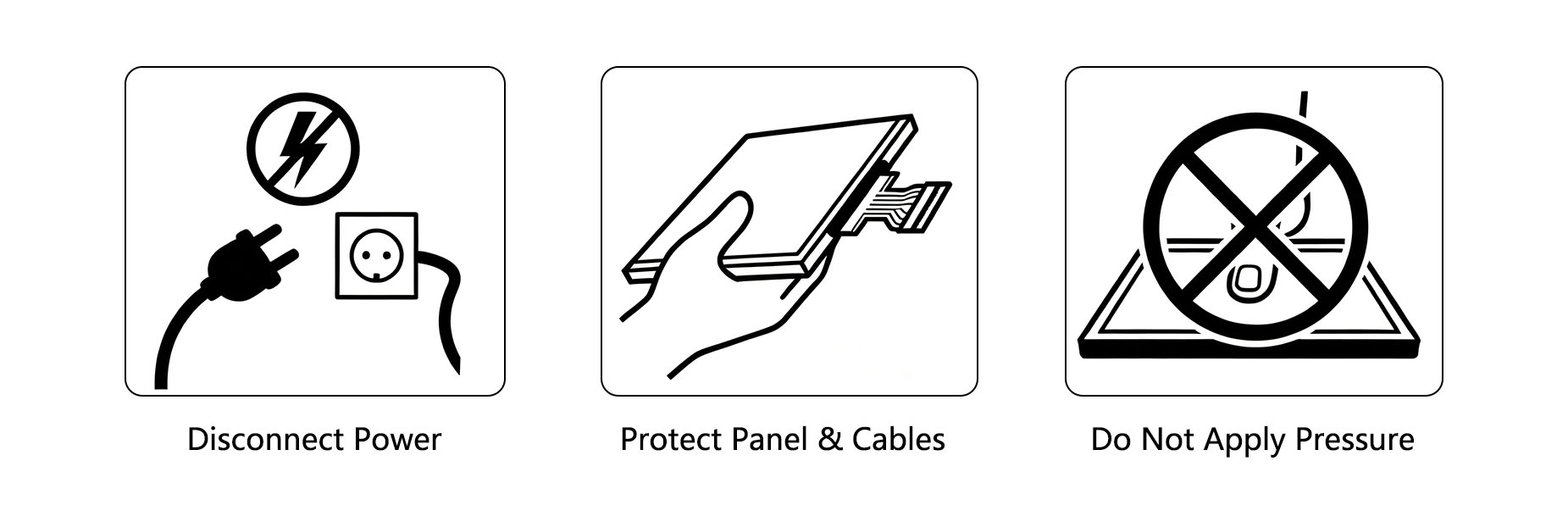
Перед вскрытием коммерческого ЖК-дисплея или проведением внутреннего осмотра всегда соблюдайте правила электробезопасности и защиты от электростатического разряда.
Перед обслуживанием дисплея:
Полностью отключите питание от сети переменного тока.
Отключите адаптер питания или отсоедините его от сети.
В соответствии с требованиями безопасности производителя оборудования, необходимо обеспечить достаточное время для разрядки внутренних компонентов.
Никогда не выполняйте внутренний ремонт и не подключайте/отключайте компоненты, когда оборудование находится под напряжением, за исключением случаев, когда квалифицированный специалист проводит специальную проверку электрооборудования под напряжением.
Избегайте прямого контакта:
Контакты кабеля LVDS/eDP
Контакты разъема
Поверхности ЖК-панели
Оптические пленки
Компоненты светодиодной подсветки
При работе с чувствительными электронными компонентами используйте соответствующие средства защиты от электростатического разряда, например, антистатический браслет.
ЖК-панели — это высокоточные компоненты. Не нажимайте, не ударяйте, не сгибайте и не сжимайте панель во время установки или обслуживания.
Физические повреждения слоя жидкого кристалла, структуры TFT или области соединения COF, как правило, необратимы и могут потребовать полной замены ЖК-панели.
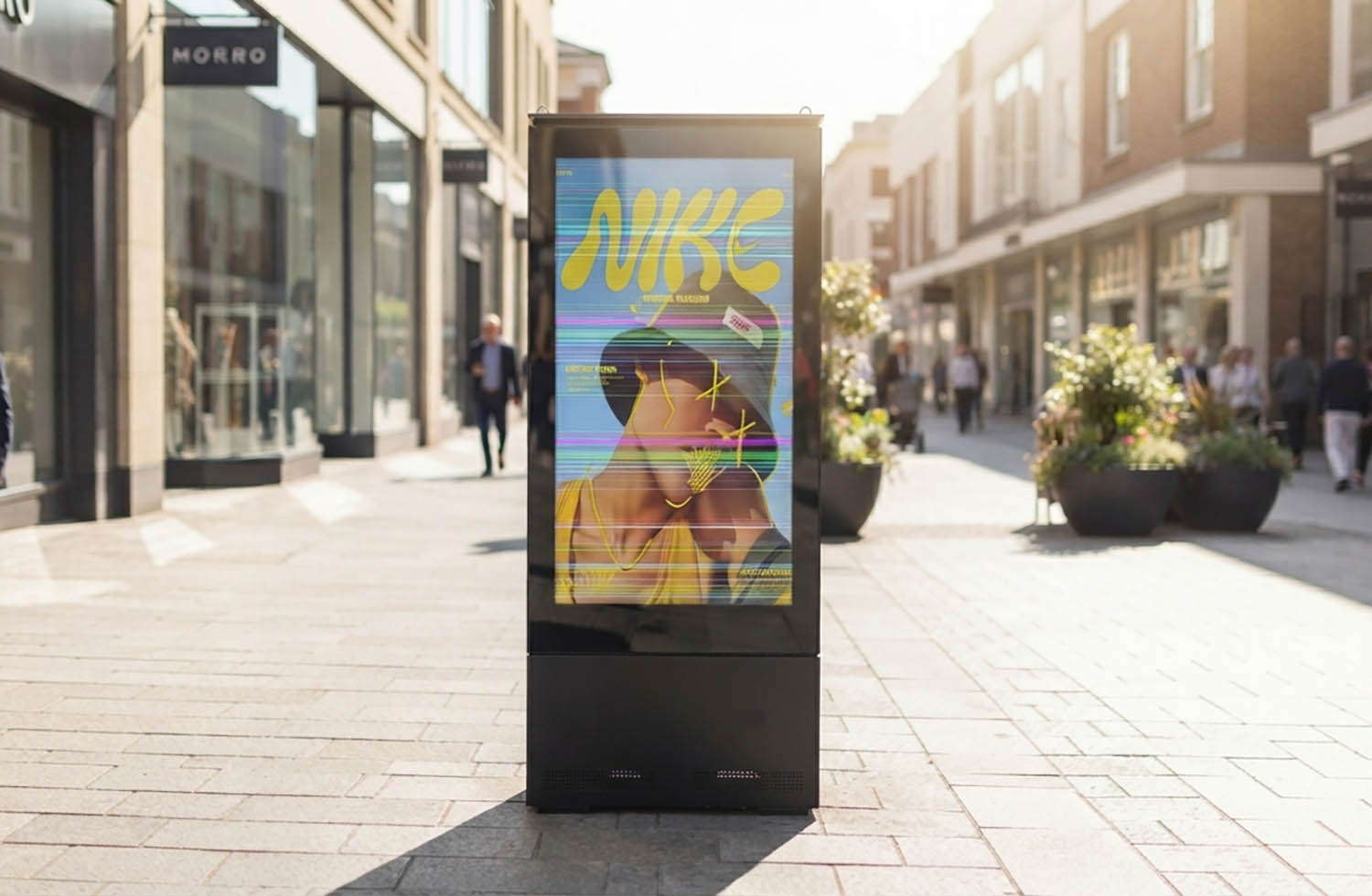
На ЖК-экране отображаются фиксированные горизонтальные, вертикальные или цветные линии. Линии обычно остаются в одном и том же положении независимо от отображаемого контента.
К распространённым причинам относятся:
Ненадежно подключенные или плохо соединенные кабели LVDS/eDP
Окисленные или загрязненные разъемы
Изогнутые или поврежденные кабели дисплея
Повреждение внутреннего кабеля или проводника
Проблемы с выводом сигнала на плату драйвера
Неисправность ЖК-панели или соединения COF.
Начните с осмотра кабеля LVDS/eDP и его разъемов. Проверьте наличие ослабленных соединений, загрязнений, окисления, чрезмерного изгиба или видимых физических повреждений.
Надежно подсоедините кабель и убедитесь, что он не находится под натяжением и не сдавливается корпусом.
Если проблема сохраняется, используйте заведомо исправный кабель или совместимую плату драйвера для проверки работоспособности.
Если линия остается неизменной после исключения неисправностей кабеля и платы драйвера, проблема, скорее всего, связана с ЖК-панелью или зоной соединения COF-компонентов.
Прерывистая линия: скорее всего, проблема в кабеле или разъеме.
Зафиксированные строки в одном и том же положении: скорее всего, это проблема на уровне панели или связанная с COF.
В случае неисправности на уровне панели обычно требуется замена ЖК-панели, а не традиционный ремонт.
На экране отображаются видимые волны, складки, неровная текстура, пузырьки или искажение изображения. Проблема может быть особенно заметна при отображении белого, серого или других однородных цветов.
Типичные причины включают:
Старение или деформация поляризатора
Тепловая деформация рассеивающих или светоизлучающих пленок
Чрезмерное механическое давление от рамы
Плохая вентиляция или длительная эксплуатация при высоких температурах.
Внутренние структурные напряжения или неправильная сборка
Сначала проверьте, является ли внешняя поверхность ЖК-панели физически плоской.
Если внешняя поверхность в норме, но изображение содержит внутренние волны или искажения, осмотрите оптическую пленку и блок подсветки.
Также следует проверить систему охлаждения. Очистите забитые вентиляционные отверстия и вентиляторы, а также убедитесь в достаточном притоке воздуха к дисплею.
Проверьте раму, монтажную конструкцию и крепежные винты на наличие чрезмерного механического давления.
Можно отслеживать незначительные и стабильные оптические деформации, не влияющие на нормальное изображение.
При сильной или прогрессирующей деформации обычно требуется замена поврежденного оптического компонента или ЖК-модуля.
Важно: Постоянную деформацию оптических пленок, как правило, невозможно исправить простой регулировкой.
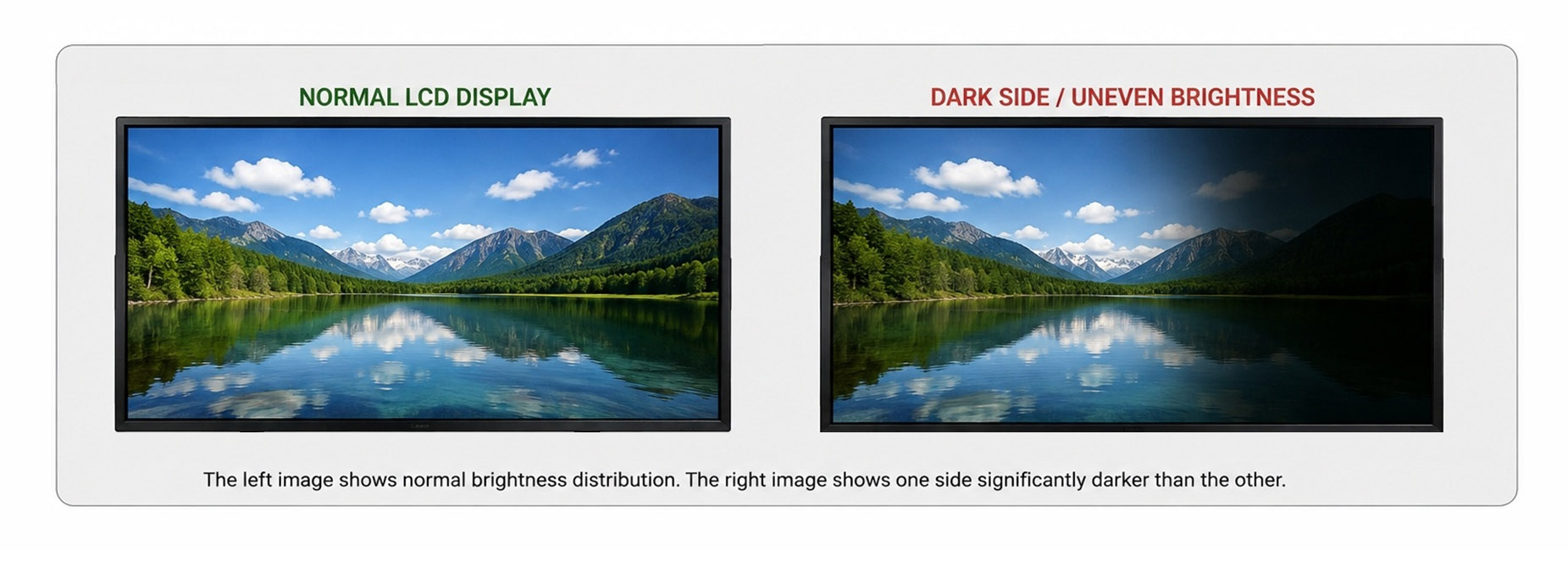
Одна сторона или область ЖК-дисплея — например, левая, правая, верхняя или нижняя — заметно темнее остальной части экрана, в то время как изображение остается видимым.
К распространённым причинам относятся:
Неисправные светодиодные ленты подсветки
Стареющие или вышедшие из строя светодиодные чипы
Ослабленные контакты питания подсветки
Проблемы в цепи управления подсветкой
Неправильно выровненные или поврежденные оптические пленки
Долговременное термическое напряжение
Для начала проверьте соединения питания подсветки и соответствующую проводку.
Далее определите, соответствует ли темная область конкретной светодиодной ленте или участку подсветки.
Если соответствующий участок подсветки не светится должным образом, проверьте или замените совместимую светодиодную ленту подсветки.
Если подсветка работает некорректно, следует проверить цепь драйвера подсветки.
Если вся система подсветки освещается равномерно, но определённая область изображения остаётся тёмной, проблема может быть связана с ЖК-панелью или схемой TFT-дисплея.
Ключевой вопрос:
Темная область вызвана подсветкой или же темное изображение создается самой ЖК-панелью?
Выявление этого различия до замены панели может значительно сократить ненужные затраты на техническое обслуживание.
На экране постоянно меняется яркость, наблюдается мерцание или нестабильное движение изображения. Мерцание может затрагивать весь экран или только определенную область.
Некоторые виды высокочастотного мерцания могут быть незаметны для человеческого глаза, но иногда их можно обнаружить с помощью камеры смартфона.
Возможные причины включают:
Нестабильный выход адаптера питания
Плохое качество соединения кабеля LVDS/eDP.
Проблемы со светодиодной подсветкой или драйвером подсветки.
Стареющие или плохо подключенные светодиодные ленты
Проблемы с платой драйвера или прошивкой.
Неправильное заземление
Внешние электромагнитные помехи
Практическая последовательность действий при поиске и устранении неисправностей следующая:
Питание → Кабель дисплея → Подсветка → Плата драйвера/Прошивка → Заземление
Если яркость всего экрана резко меняется, в первую очередь проверьте блок питания и систему подсветки.
Если подсветка остается стабильной, но сигнал изображения кажется нестабильным, проверьте кабель дисплея и плату драйвера.
При необходимости следует также подтвердить совместимость прошивки.
Камеру смартфона можно использовать в качестве предварительного инструмента для наблюдения за высокочастотным мерцанием, но она не должна заменять профессиональное электроизмерительное оборудование.
Черный экран обычно можно разделить на две ситуации:
Устройство включено, но на экране нет видимого изображения.
Устройство полностью не реагирует, включая отсутствие индикатора состояния.
К распространённым причинам относятся:
сбой питания переменного или постоянного тока
Поврежден адаптер питания или плата питания.
Сбой светодиодной подсветки
Ослабленный или поврежденный кабель дисплея
Сбой платы драйвера
Неисправность ЖК-панели
Сначала проверьте вход переменного тока, адаптер питания и индикатор состояния устройства.
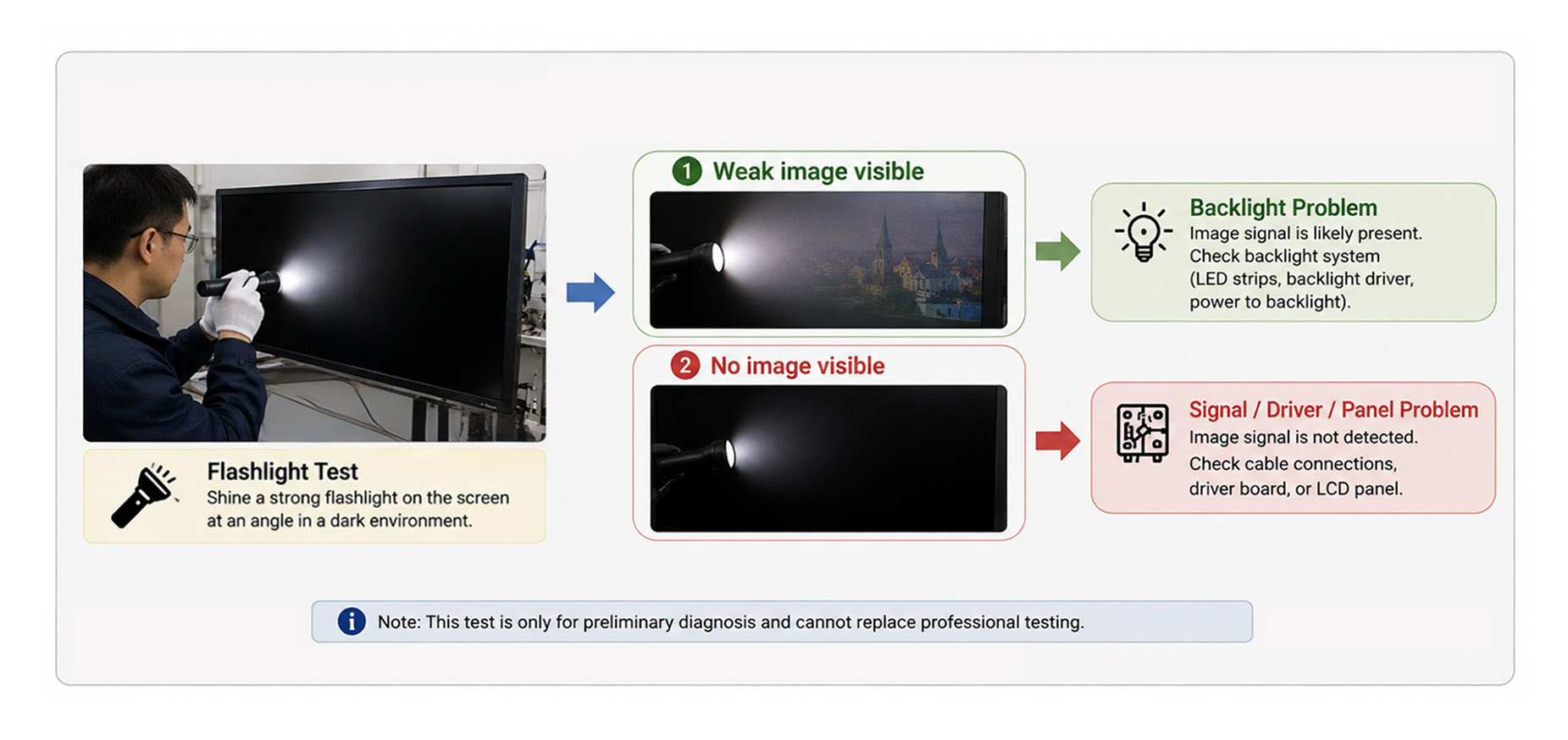
Если устройство включено, но экран остается черным, проверка с помощью фонарика может дать предварительное представление о том, работает ли подсветка.
Направьте на экран мощный фонарик под углом в относительно темном помещении.
Если видно слабое изображение:
Вероятное направление → Система подсветки
Изображение с ЖК-дисплея может по-прежнему присутствовать, поэтому проверьте светодиодные ленты подсветки, схему драйвера подсветки и подключение питания подсветки.
Если изображение вообще не видно:
Вероятный путь прохождения сигнала → Траектория сигнала, плата драйвера или ЖК-панель
Проверьте соединение LVDS/eDP и при необходимости используйте совместимые запасные части для перекрестного тестирования.
| Проверка фонарика | Первоначальный диагноз | Основные компоненты для проверки |
| Слабое видимое изображение | Проблема с подсветкой | Светодиодные ленты, драйвер подсветки, разъем питания. |
| Изображение не отображается | Проблема с сигналом/драйвером/панелью управления. | Кабель, плата драйвера, ЖК-панель |
Примечание: Проверка с помощью фонарика — это лишь предварительный диагностический метод. Для окончательной диагностики следует использовать профессиональные электротехнические испытания.
Внутри дисплея видны мелкие белые или серые частицы, пылевые пятна или посторонние вещества, которые невозможно удалить, очистив внешнюю поверхность.
Внутреннее пылеобразование может быть вызвано следующими причинами:
Изношенные или поврежденные уплотнительные материалы
Плохая герметизация блока подсветки
Пыль проникает через щели.
Загрязнение в процессе производства или технического обслуживания.
Предыдущая разборка или ремонт
Сначала определите, находится ли пыль на внешней поверхности или внутри дисплея.
Если вблизи края находится лишь несколько мелких частиц, которые не влияют на нормальное изображение, разборка может не потребоваться.
Если требуется внутренняя очистка, вскрытие блока подсветки должно производиться только обученным персоналом в чистых и контролируемых условиях.
Оптические пленки особенно чувствительны к пыли, отпечаткам пальцев и царапинам. Вскрытие блока подсветки в обычных условиях эксплуатации может привести к еще большему загрязнению.
Если подходящее чистое помещение недоступно, замена ЖК-модуля может оказаться более надежным решением, чем попытка очистки в полевых условиях.
На экране появляются стойкие черные пятна, темные участки, неровные загрязнения или узоры, напоминающие воду и имеющие цвет. В некоторых случаях поврежденный участок может постепенно расширяться.
К распространённым причинам относятся:
Удар или физический шок
Чрезмерное давление на ЖК-панель
Повреждение слоя жидких кристаллов
повреждение структуры TFT
Неравномерное механическое напряжение во время монтажа
Сильное термическое напряжение
При подозрении на утечку жидкости или физическое повреждение панели не следует надавливать, протирать или сжимать поврежденный участок.
Осмотрите корпус, раму, монтажную конструкцию и крепежные винты, чтобы определить, не способствовало ли чрезмерное механическое напряжение возникновению проблемы.
Физические повреждения слоя жидкого кристалла или структуры TFT, как правило, необратимы.
В таких случаях, как правило, подходящим решением является замена ЖК-панели на совместимую.
⚠️ Важно: Никогда не надавливайте на место предполагаемой протечки. Дополнительное давление может привести к расширению поврежденного участка.
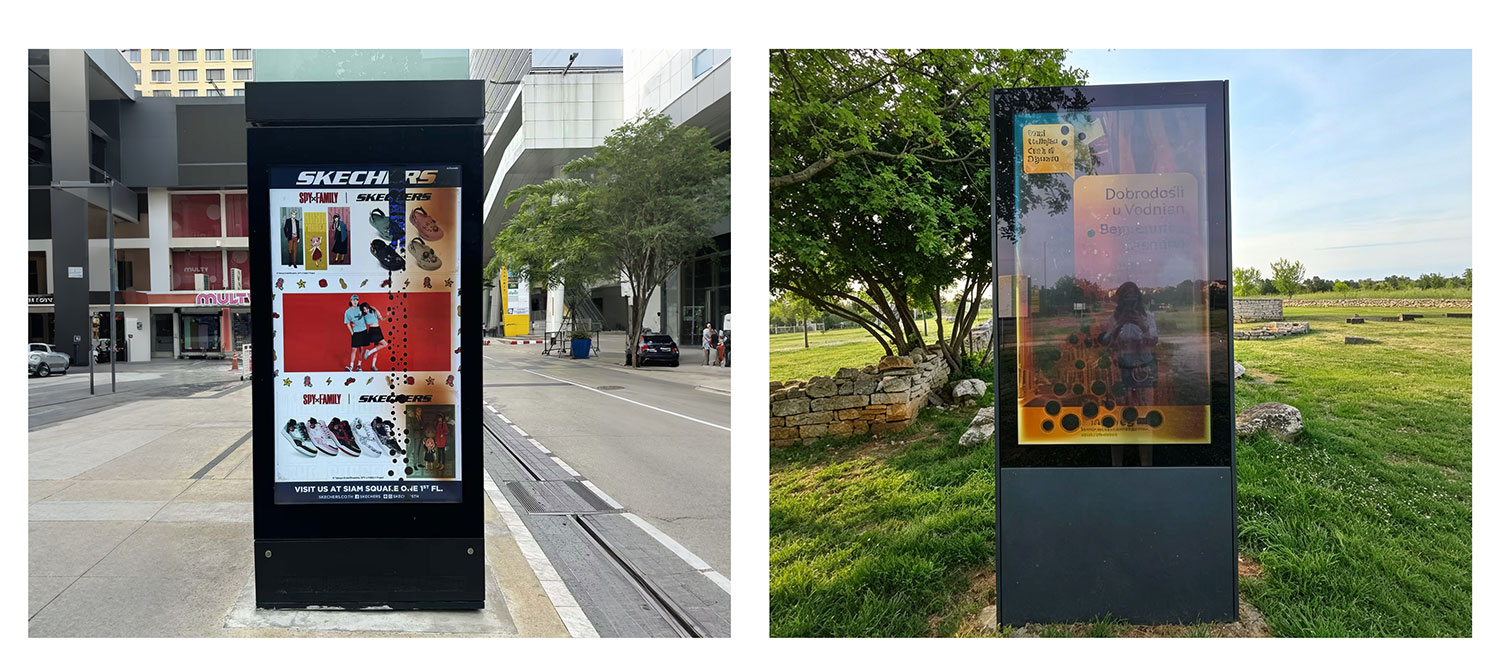
Отдельный участок ЖК-экрана выглядит заметно темнее окружающего, без явных искажений или видимых линий.
Возможные причины включают:
Неисправные или изношенные компоненты светодиодной подсветки
Сбой светодиодной подсветки
Повреждение схемы TFT-дисплея или панели
повреждение связей COF
Деформация оптической пленки
Долговременное термическое напряжение
Сначала определите, видна ли информация изображения в темной области.
Затем проверьте, нормально ли работает соответствующая секция подсветки.
Если подсветка в этой области не горит, проверьте светодиодную ленту подсветки и драйвер подсветки.
Если подсветка загорается равномерно, но изображение постоянно остается темным в определенной области, проблема может быть связана с ЖК-панелью или схемой TFT-дисплея.
Также следует проверить температурный режим дисплея, чтобы выявить возможный долговременный перегрев.
Если подтвердится, что неисправность находится на уровне панели, замена ЖК-панели, как правило, более целесообразна, чем попытка ремонта на уровне компонентов.
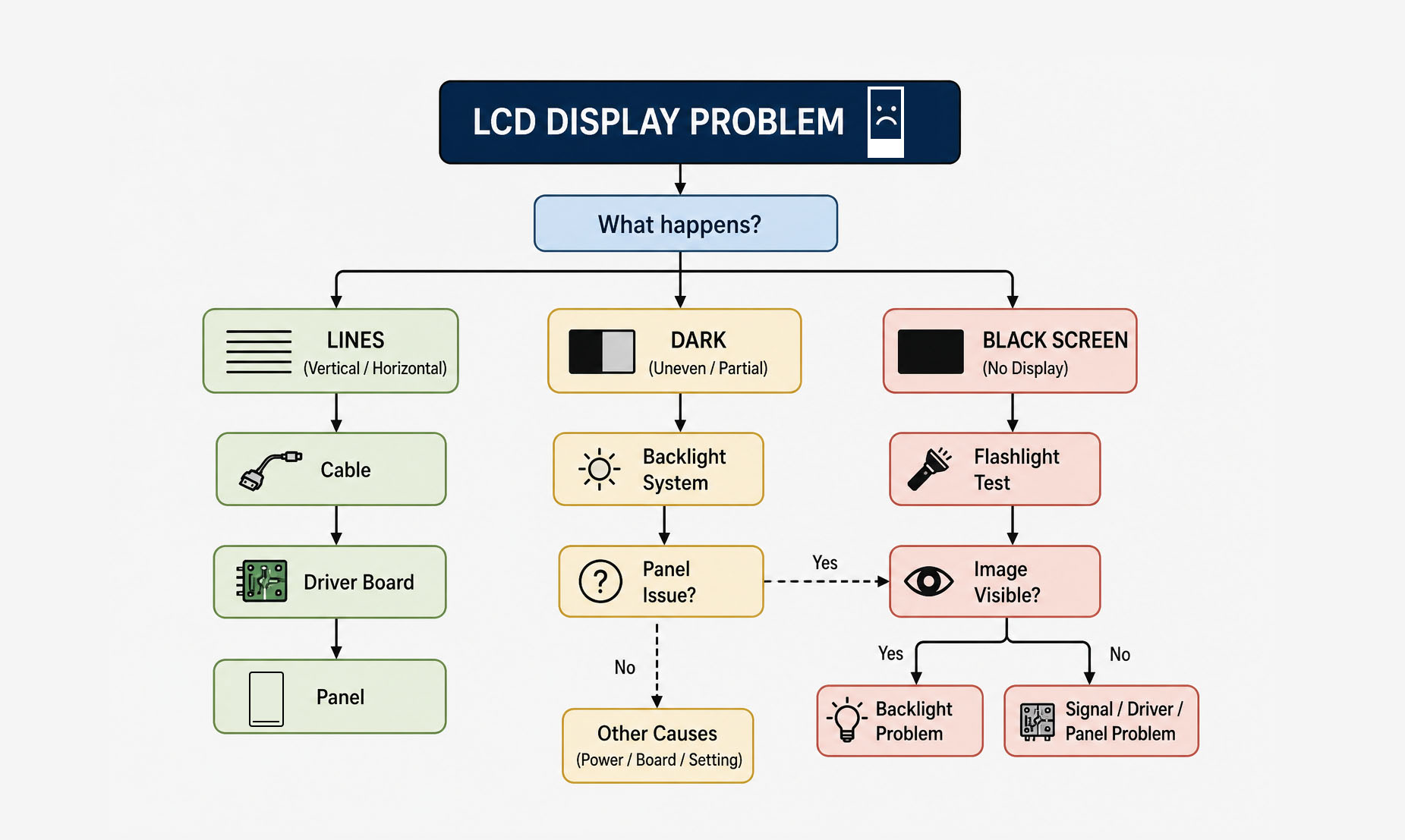
3. Краткое руководство по устранению неполадок ЖК-дисплея
Приведенная ниже таблица представляет собой краткий справочник для диагностики распространенных проблем с коммерческими ЖК-дисплеями.
| Проблема с отображением | Основные указания по устранению неполадок | Типичное действие |
|---|---|---|
| Фиксированные горизонтальные/вертикальные линии | Кабель → Плата драйвера → Панель | Подключите обратно → Замените кабель → Проверьте плату драйвера → При необходимости замените панель |
| Прерывистые линии | Кабель/разъем | Проверьте и подключите кабель обратно. |
| Волны или морщины | Оптическая пленка / Термическое / Механическое напряжение | Проверьте систему охлаждения и крепление → Замените поврежденные оптические компоненты |
| Одна сторона темнее | Светодиодная подсветка / Драйвер | Проверьте соединения → Подсветка → Цепь драйвера |
| Мерцание экрана | Питание / Кабель / Подсветка / Драйвер | Проверяйте системы в последовательности. |
| Черный экран с едва различимым изображением | Подсветка | Проверьте светодиодные ленты и драйвер подсветки. |
| Черный экран без изображения. | Питание / Сигнал / Драйвер / Панель | Проверьте питание → Кабель → Плата драйвера → Панель |
| Внутренняя пыль | Герметизация / Загрязнение | Оцените необходимость → Проведите очистку в контролируемой среде или замените модуль. |
| Черные пятна / Утечка света через ЖК-экран | ЖК-панель | Обычно заменяют панель. |
| Локализованная темная область | Подсветка или панель | Определите, в чём причина неисправности: в подсветке или в самой панели. |
4. Ремонт или замена ЖК-панели?
Не каждая проблема с ЖК-дисплеем требует замены всей панели.
Эти проблемы часто можно решить заменой или ремонтом отдельных компонентов:
Ослабленные или поврежденные кабели дисплея
Проблемы с адаптером питания
Сбой светодиодной подсветки
Проблемы с драйвером подсветки
Сбой платы драйвера
Засорение системы охлаждения
Старение уплотнительных материалов
Некоторые проблемы с прошивкой или конфигурацией.
Замена панели обычно требуется в тех случаях, когда проблема связана с необратимыми физическими повреждениями, такими как:
Физическое повреждение ЖК-панели
Утечка жидкого кристалла
Серьезное повреждение TFT-транзистора
Разрушение соединения COF
Постоянные дефекты изображения на уровне панели
Серьезное и необратимое повреждение оптического оборудования.
Сначала диагностируйте, затем замените.
Прежде чем заменять дорогостоящую ЖК-панель или плату драйвера, специалистам следует сначала исключить более простые причины, такие как проблемы с питанием, кабельными соединениями, разъемами и светодиодной подсветкой.
5. Профилактическое обслуживание коммерческих ЖК-дисплеев
Регулярное профилактическое техническое обслуживание может помочь снизить количество непредвиденных поломок и повысить надежность работы дисплея в долгосрочной перспективе.
| Периодичность технического обслуживания | Рекомендуемые проверки |
|---|---|
| Ежемесячно | Очистите вентиляционные отверстия и наружные поверхности; проверьте силовые кабели, разъемы и заземление. |
| Ежеквартальный | Проверьте внутренние кабели, конструкцию крепления, состояние подсветки и циркуляцию охлаждающего воздуха. |
| Ежегодно | Проверьте выходную мощность, износ светодиодной подсветки, вентиляторы охлаждения, систему терморегулирования и герметизирующие материалы. |
Регулирование теплового режима особенно важно для рекламных ЖК-дисплеев высокой яркости и наружных цифровых вывесок.
Убедитесь, что дисплей имеет достаточное пространство для вентиляции, и избегайте:
Блокировка вентиляционных отверстий
Установка дисплея непосредственно вплотную к стене без достаточной циркуляции воздуха.
Непрерывная работа при чрезмерно высоких температурах окружающей среды.
Допускает сильное скопление пыли вокруг вентиляторов или компонентов системы охлаждения.
Правильное управление температурным режимом может помочь снизить преждевременное старе

 Тел. : 8613728004632Тел. : 8602082332833
 Электронная почта : info@cnlcdisplay.com
 ОСТАВАЙСЯ НА СВЯЗИ Получайте наши новости, предложения и многое другое...